
Implementing a Zero Trust security strategy is a profound shift. It’s moving away from the old “trust but verify” model to a much stricter, more realistic principle: "never trust, always verify."
In practice, this means rolling out a phased roadmap. You start by assessing your most critical assets and data flows. From there, you design the right policies and architecture, run a small-scale pilot to work out the kinks, execute a full rollout, and finally, operate and continuously tune the environment.
Why Zero Trust Is Your Best Security Strategy
The traditional "castle-and-moat" security model is broken. It was built for a world that no longer exists.
In an age of cloud apps, remote work, and increasingly sophisticated threats, the whole idea of a secure "internal" network is an illusion. Your sensitive data—whether it's patient records, client financial information, or proprietary legal documents—doesn't live neatly behind a firewall anymore. It’s on laptops in coffee shops, flowing through cloud apps like Microsoft 365, and being accessed from personal devices we can't fully control.
This new reality demands a new security philosophy. Zero Trust operates on a simple but powerful assumption: no user, device, or application should be trusted by default, regardless of whether it's inside or outside your network perimeter. Every single access request has to be explicitly verified, every single time.
This is a complete departure from legacy security. If you want to get deeper into how this model stacks up against older methods, we've broken down the key differences between Zero Trust and perimeter security. This shift is especially critical for businesses in regulated industries like healthcare, finance, and legal services, where the consequences of a breach are particularly severe.
The Urgency of a New Approach
The data shows good intentions are falling short. According to a recent report, a staggering 82% of organizations see Universal Zero Trust Network Access (ZTNA) as essential to their security.
And yet, only 17% have actually fully implemented it.
That creates a massive 65-point gap between ambition and reality, leaving a huge window of risk open for attackers. Implementing Zero Trust closes this divide by giving you a structured framework to defend against modern threats. The core benefits are immediate and tangible:
- Actionable Step: Reduce Your Attack Surface. Grant access only to specific resources on a need-to-know basis. This chokes off an attacker's ability to move laterally through your network if one account or device gets compromised.
- Actionable Step: Enhance Data Protection. Make security follow the data. By focusing on user and device identity instead of network location, you protect sensitive information wherever it goes.
- Actionable Step: Improve Your Compliance Posture. The strict access controls, detailed logging, and continuous monitoring baked into Zero Trust directly support the stringent requirements of regulations like HIPAA, PCI-DSS, and the NY SHIELD Act.
By continuously verifying identity, device health, and context for every single request, you build a resilient security posture that adapts to the modern work environment instead of fighting against it.
To get a handle on the foundational concepts, there are some great comprehensive resources on Zero Trust that can help. Ultimately, adopting this strategy isn't just a technical upgrade; it's a strategic business decision to safeguard your most valuable assets in a world where trust is a liability.
Building Your Zero Trust Blueprint
Transitioning to a Zero Trust model isn't about buying a single piece of software; it's a fundamental shift in your security mindset. A successful implementation starts with a detailed plan, merging two critical early phases: assessing what you have and designing how you'll protect it.
Start with a candid assessment. First, identify your most critical assets—the "crown jewels" of your organization. For a healthcare clinic, this is patient data governed by HIPAA. For a law firm, it's confidential client files. For a financial services firm, it's the sensitive client PII scrutinized under FINRA and PCI-DSS.
Next, map out your data flows. Trace how information travels between users, devices, apps, and networks. Ask these questions:
- Where does client data originate?
- Which cloud services touch it?
- Who actually needs access to do their job, and from where?
This exercise almost always reveals security gaps you never knew you had.
This diagram visualizes the entire five-phase implementation journey, from that initial assessment all the way through to ongoing operations.
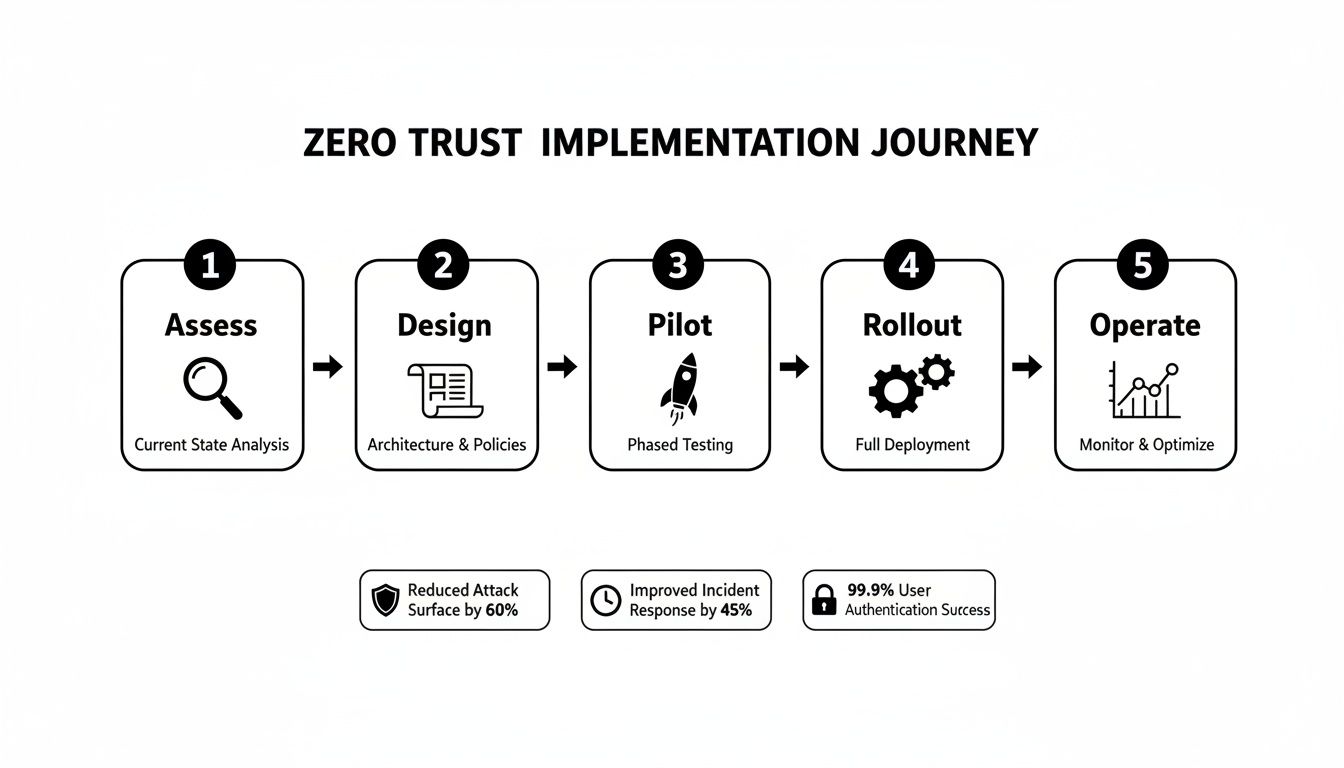
As you can see, a successful strategy is built on a methodical progression. Each phase logically informs the next, creating a cohesive and resilient security posture.
Designing Your Zero Trust Architecture
With a clear picture of your assets and weak spots, you can start designing a practical Zero Trust architecture. This isn’t about theory; it’s about creating specific, enforceable rules that govern every single access request in your environment.
A core, actionable tactic is micro-segmentation. Think of it as creating digital vaults around your most sensitive systems. Instead of one large, flat network where a single compromised account can lead to a massive breach, you create small, isolated zones.
For example, a law firm should place its document management system in a totally separate segment from its general office network. That way, even if a phishing attack compromises a user's workstation, the attacker can't just pivot over to confidential client files. The connection is severed by default.
This design work directly informs your security policies, which are the real heart of a Zero Trust model.
Creating Granular Access Policies
Your policies must answer four key questions for every single access attempt: who, what, where, and when. Defining a robust access control policy is a critical part of any Zero Trust blueprint. This is where you put the principle of least privilege access into action.
Instead of giving a user broad access based on their role, grant them the bare minimum permissions needed to complete a specific task. Nothing more.
Zero Trust policy design isn't about blocking people; it's about enabling secure, productive work. The goal is to make the right way to access data the easiest and most secure way, building security directly into the workflow.
Here are actionable policy examples:
- Healthcare Scenario: A nurse tries to access patient records (the "what") from a hospital-issued tablet (the "where"). Action: Policy verifies her identity with multi-factor authentication (MFA) and confirms the tablet is compliant (up-to-date, encrypted). Access is granted. If she tries to access the same records from an unknown personal device off-site, access is blocked.
- Financial Firm Scenario: An advisor needs to access a client's portfolio from their work laptop while traveling. Action: Policy verifies their identity via MFA and checks their location. Because they are outside the office, the policy grants read-only access but blocks any fund transfer capabilities until they are back on a trusted network.
The urgency to adopt these controls is obvious when you look at market trends. The global Zero Trust market is expected to explode from $24,690 million in 2024 to a projected $73,020 million by 2032. For businesses in the New York region facing mandates like HIPAA and the NY SHIELD Act, this isn't just a trend—it's an immediate need.
This blueprint becomes your guide for everything that follows, ensuring every technical decision and policy rule aligns with your core security goals.
From Pilot Project to Full-Scale Rollout
You have a solid Zero Trust blueprint. Now it's time to bring that plan to life, moving from diagrams on a whiteboard to a living, breathing security framework. The most effective method isn't a big-bang, company-wide launch. It’s a deliberate, phased approach that kicks off with a carefully chosen pilot project.

The goal of a pilot is simple: test your policies and technology in a controlled environment. This lets you gather real-world feedback, iron out the kinks, and score a quick win—all without disrupting the entire organization.
Selecting Your First Pilot Project
Choosing the right pilot is critical. Select a project that is both low-risk and high-impact. It needs to be small enough to manage but significant enough to prove the value of your Zero Trust model. Do not target your most complex, mission-critical system right out of the gate.
Instead, find a self-contained use case where you can apply a few core Zero Trust principles. A great starting point is securing access to a specific cloud application for a single department. For example, focus on how your finance team accesses its cloud-based accounting platform.
Here are the criteria for a strong pilot project:
- Contained User Group: Choose a single team like Finance or HR. This keeps user training and feedback manageable.
- Specific Application: Secure one key SaaS platform, like Microsoft 365, to test identity and device policies in a very focused way.
- Clear Success Metrics: Define what "success" looks like beforehand. It could be successfully blocking access from non-compliant devices or ensuring all logins use MFA without creating user friction.
By starting small, you create a feedback loop to see how new policies affect real workflows and make adjustments before expanding.
Integrating with Your Existing Technology
A common myth is that Zero Trust requires you to rip and replace your entire tech stack. The reality is that a successful rollout integrates with and strengthens the tools you already have. For many SMBs, the Microsoft 365 and Azure ecosystem is the most practical place to start.
These platforms have powerful, built-in Zero Trust capabilities that can form the foundation of your entire strategy. Take these actions:
- Use Microsoft Entra ID (formerly Azure AD): Make this your central identity provider. Here, you must enforce strong authentication policies, including phishing-resistant MFA, for every user.
- Deploy Microsoft Intune: Use this as your command center for device management and compliance. Intune lets you verify that every device—company-owned or personal—meets your security standards before it touches company data.
- Build Conditional Access Policies: This is where it all comes together. Create granular rules that grant, block, or limit access based on real-time signals like user risk, location, and device health.
For example, a lawyer could access client files from a firm-managed laptop after passing an MFA challenge. But if they try to access those same files from a personal, unmanaged tablet at a coffee shop, your policy should automatically block access or grant read-only permissions.
The most effective Zero Trust strategy leverages the security tools you already own. By activating and properly configuring the capabilities within platforms like Microsoft 365, you can achieve significant security gains without a massive new investment.
Executing a Phased Rollout Strategy
Once your pilot proves successful, you have a working model you can expand on. Resist the temptation to "flip the switch" for everyone at once. Instead, continue with a methodical, phased rollout, extending your Zero Trust controls department by department or application by application.
This iterative approach ensures a smooth transition and minimizes operational disruption. Use the lessons learned from your first pilot to refine policies and communication for the next group.
Follow this actionable phased rollout plan:
- Phase 1 (Pilot): Secure Microsoft 365 access for the finance department.
- Phase 2: Expand those same Microsoft 365 policies to the HR and legal teams.
- Phase 3: Start applying device compliance and MFA policies to another key SaaS app, like your CRM.
- Phase 4: Begin segmenting the network to isolate sensitive servers, applying the same "never trust, always verify" mindset to internal resources.
Throughout this process, proactive communication is your most important tool. Explain why these changes are happening. Frame the new security measures not as hurdles, but as safeguards protecting both the company and employees. Provide clear instructions, offer training, and create an easy way for users to ask questions or report issues.
Operating and Optimizing Your Zero Trust Environment
Rolling out your Zero Trust policies isn’t the finish line—it’s the starting line for a new, dynamic security posture. A Zero Trust environment is a living system. It needs constant attention to stay effective, shifting the work from one-time implementation to ongoing management and optimization.

This ongoing commitment is critical because your business and the threats you face are always changing. New apps get adopted, employees switch roles, and attackers find new ways in. Your security model must adapt in real-time.
Establishing Continuous Monitoring and Visibility
You can't protect what you can't see. The "always verify" principle of Zero Trust requires rich, real-time data from across your entire IT environment. You must pull telemetry from endpoints, networks, apps, and user directories to build a complete picture of every single access request.
This is where a 24/7 Security Operations Center (SOC) becomes non-negotiable. A SOC provides the human expertise and advanced tools to analyze the constant flood of security data, sort real threats from the noise, and respond before a minor alert becomes a major breach.
Your action plan for continuous visibility must include:
- Managed SIEM (Security Information and Event Management): Implement this technology to pull and correlate log data from all your systems, giving you a single pane of glass for threat detection.
- Proactive Threat Hunting: Go beyond automated alerts. Have security analysts actively search your environment for signs of sophisticated threats that might have slipped past your initial defenses.
- Endpoint Detection and Response (EDR): Deploy EDR for deep visibility into individual devices. This allows you to spot and isolate a compromised machine before an attacker can start moving laterally.
For a deeper dive into how different security services work together, we've outlined the key distinctions in our comparison of XDR vs MDR solutions. Understanding these models is key to building a comprehensive monitoring strategy.
Tracking Key Performance Indicators
To know if your Zero Trust implementation is working, you must measure it. Tracking the right Key Performance Indicators (KPIs) helps you quantify your security posture, spot areas for improvement, and prove the value of your investment.
Focus on metrics that give you actionable insights.
Actionable Zero Trust KPIs to Monitor:
| KPI Category | Specific Metric to Track | What to Do With the Data |
|---|---|---|
| Identity Health | Number of failed MFA challenges or risky sign-in alerts. | Spikes can indicate targeted phishing campaigns. Immediately investigate affected accounts. |
| Device Posture | Percentage of devices that are non-compliant. | A high rate signals gaps in patching. Remediate these devices or block their access. |
| Access Patterns | Volume of access requests blocked by policy. | If this number is too low, your policies may be too permissive. If it's too high, you may be blocking legitimate work. Adjust accordingly. |
| Threat Detection | Mean Time to Detect (MTTD) and Mean Time to Respond (MTTR). | Track these metrics to measure and improve your SOC's efficiency in handling incidents. |
These KPIs give you a real-time dashboard of your Zero Trust environment, allowing you to make data-driven decisions to fine-tune your policies.
Maturing Your Zero Trust Model Over Time
The operational phase is also about evolution. Your first implementation is the foundation, but a mature Zero Trust model incorporates more advanced controls as your organization grows.
This process thrives on continuous validation. By 2026, Zero Trust is expected to move from a buzzword to a baseline security architecture. But there's a gap: industry analysis shows that while 63% of organizations have a strategy, only 18% have fully put it into practice. For our Tri-State clients in healthcare, finance, and manufacturing, closing this gap means embedding Zero Trust into every engagement with 24/7 SOC, EDR, and SIEM to ensure HIPAA and PCI compliance.
Zero Trust isn't a destination; it's a continuous journey of improvement. Your goal is to consistently raise the bar for attackers by refining policies, strengthening verification, and reducing the implicit trust in your environment.
As your model matures, implement these advanced concepts:
- Data-Level Controls: Apply security policies directly to sensitive data files, so they stay protected even if they leave your network.
- AI-Driven Analytics: Use machine learning to spot anomalous user behavior that could signal a compromised account—like an employee suddenly accessing unusual files at 3 AM.
- Automated Policy Adaptation: Build policies that can dynamically adjust access permissions based on real-time risk signals, all without manual intervention.
By treating Zero Trust as an ongoing program of refinement, you build a resilient security framework that can adapt and protect your business for years to come.
Mapping Zero Trust to Your Compliance Needs
For any business in a regulated field, security isn’t just about protecting data—it’s about proving that protection to auditors. A Zero Trust model is a core piece of your compliance strategy. It gives you clear, auditable evidence that you’re meeting your legal and contractual duties.
The core ideas of "never trust, always verify" and least-privilege access are direct answers to the tough requirements found in regulations like HIPAA, PCI-DSS, and the NY SHIELD Act. When an auditor asks how you control access to patient data, Zero Trust gives you a definitive, verifiable answer.
This shifts the conversation from just having security tools to demonstrating a living security framework. Instead of pointing to a firewall, you can show a policy that demands explicit user and device verification for every single attempt to access sensitive data, no matter where it comes from.
Turning Zero Trust Controls into Compliance Evidence
The real power here is mapping specific security controls directly to compliance mandates. This isn't theoretical—it’s about generating the concrete logs and reports that make auditors happy. Every failed login attempt, every successful MFA challenge, and every policy enforcement action becomes an entry in your compliance ledger.
Here’s how to apply Zero Trust to specific regulations:
- HIPAA (Health Insurance Portability and Accountability Act): The HIPAA Security Rule demands strict access controls over ePHI. Action: Enforce identity verification and device compliance checks before granting anyone access to patient records. This directly addresses HIPAA’s rules for unique user identification and authorization.
- PCI-DSS (Payment Card Industry Data Security Standard): A cornerstone of PCI-DSS is network segmentation. Action: Use micro-segmentation to create tiny, isolated network zones that stop attackers from moving laterally. This drastically shrinks the blast radius of a potential breach and satisfies the requirement.
- NY SHIELD Act: This law requires reasonable safeguards for private information. Action: Implement continuous monitoring and risk-based access policies as a powerful technical safeguard, showing you’ve done your due diligence to protect that data.
Align your security architecture with compliance from the start to turn your Zero Trust rollout into a tool for simplifying audits. The proof of control is baked right into your daily operations, not scrambled together a week before an auditor shows up.
The table below shows how specific Zero Trust controls directly map to the requirements of major compliance frameworks.
Zero Trust Controls vs. Compliance Requirements
| Compliance Requirement | Relevant Zero Trust Control | How It Helps |
|---|---|---|
| HIPAA: Control access to ePHI (45 CFR § 164.312(a)(1)) | Identity-aware access policies (MFA, Conditional Access) | Ensures only verified, authorized clinical staff and BAs can access specific patient records, logging every attempt. |
| PCI-DSS: Restrict access to cardholder data by business need-to-know (Requirement 7) | Least-privilege access and micro-segmentation | Isolates payment processing systems. Even if a user on the corporate network is compromised, they can't access the CDE. |
| FINRA: Supervise and protect customer records (Rule 4511) | Continuous device posture validation and risk-based access | Prevents access to client financial data from personal, unmanaged, or non-compliant devices, protecting data integrity. |
This mapping isn't just for show; it's the foundation of a defensible compliance posture that stands up to scrutiny.
Practical Scenarios in Regulated Environments
Seeing these principles in action clarifies their value. For firms managing sensitive information, a smart Zero Trust strategy is non-negotiable. You can find out more about how this applies to data relocation in our guide on secure and compliant cloud migrations.
Imagine a financial advisory firm governed by FINRA. An advisor tries to access client portfolio data from an unfamiliar Wi-Fi network. Action: A Zero Trust policy engine sees the context—new location, unsecured network—and automatically downgrades their access to read-only, blocking any ability to make transactions. This one action demonstrates auditable compliance with rules requiring data integrity controls.
Or take a law firm that creates a micro-segment around its document management system. Action: Even if a paralegal's workstation gets hit with malware, the attacker can't pivot to access confidential client files in that walled-off zone. This provides a clear, demonstrable control that protects client confidentiality.
By making access decisions based on real-time context, you build a resilient and defensible security posture that stands up to any regulatory audit.
Got Questions About Zero Trust? We've Got Answers.
Jumping into a Zero Trust project brings up a lot of questions. Moving away from the old castle-and-moat security model is a big cultural and technical shift, so it’s natural to have concerns about the cost, complexity, and day-to-day impact.
Let's tackle the most common questions we hear from businesses on this journey. Getting these answers straight from the start helps clear up the process and gets everyone on the same page.
Can a Small Business Really Implement Zero Trust?
Absolutely. The biggest misconception is that Zero Trust is a single, expensive product. It's a security framework, and SMBs can make huge security leaps by starting with tools they probably already own.
The key is to take a phased, actionable approach. Focus on progress, not perfection. Start with these high-impact controls:
- Enforce Multi-Factor Authentication (MFA): Turn on MFA for every user. This is one of the single most impactful security moves you can make and is a non-negotiable first step.
- Leverage Strong Identity Management: If you’re using Microsoft 365, you're already sitting on a powerful identity platform. Configure it correctly.
- Implement Device Compliance Policies: Set up basic rules to ensure devices are patched and encrypted before they connect. This is a manageable and incredibly effective control.
For many SMBs, the most direct path forward is working with a managed security partner. This gives you access to enterprise-grade expertise and tools—like a 24/7 Security Operations Center (SOC)—without needing to hire a specialized team.
Will Zero Trust Get in the Way of Our Employees' Work?
When implemented correctly, Zero Trust should make secure access easier and more seamless, not harder. The goal is to weave security into the natural workflow, making the right way to do things the easiest way.
A clumsy rollout can create friction, but a strategic one does the opposite. For example, when you pair single sign-on (SSO) with conditional access policies, a user signs in once to get secure access to all their approved apps. They only see an extra check—like an MFA prompt—when the context changes, such as logging in from a new device.
A well-designed pilot program is your best tool to prevent user friction. Use it to get direct feedback from real users, allowing you to fine-tune policies to find the sweet spot between tight security and daily productivity before you go live for everyone.
What's the Biggest Mistake We Need to Avoid?
The most common—and expensive—pitfall is treating Zero Trust as just another tech project. Companies rush out to buy the latest security tools without a clear strategy and end up with a collection of expensive, disconnected systems that don't actually improve security.
Real success starts with understanding your own environment first. You must know what your most critical assets are, map out how your data flows, and understand who needs access to what before you even think about buying a new tool. A "rip and replace" strategy almost never works. Instead, weave Zero Trust principles into your current setup and mature your security controls over time. Skipping the initial assessment and design phase is a recipe for wasted money and a failed project.
How Does Zero Trust Fit with Our Cloud Services?
Zero Trust is tailor-made for cloud and hybrid environments. It was designed specifically for a world where the old network perimeter has dissolved. It shines exactly where traditional security models fall apart.
Cloud platforms like Microsoft Azure and Microsoft 365 come with powerful, built-in tools that form the cornerstones of a modern Zero Trust architecture. Your action plan should be to connect these native tools to create one cohesive security shield:
- Microsoft Entra ID (formerly Azure AD) will be your central identity control plane.
- Conditional Access will be the smart policy engine, checking every login against your rules.
- Microsoft Intune will ensure every device connecting to your data meets your health and compliance standards.
By integrating these services, you can apply consistent, powerful security policies that follow your data wherever it goes—whether it’s on a server in your office or inside a cloud app.
Ready to implement a Zero Trust security model without the guesswork? CitySource Solutions provides the strategic guidance and managed security services to build a resilient, compliant, and productive IT environment. Learn how our security-first approach can protect your business.