
A powerful HIPAA risk assessment template is more than a document; it’s a strategic tool that transforms a daunting compliance mandate into a clear, actionable process. Using a structured template in Word or Excel lets you methodically identify, score, and neutralize security risks. It’s the first step to ensuring you’ve covered all your bases, from asset inventories to corrective action plans—vital for protecting patient data and avoiding massive fines.
Going Beyond the Basic HIPAA Checklist
Many healthcare organizations fall into the trap of treating the HIPAA risk assessment like a chore—a simple checklist to tick off and forget. This "check-the-box" mindset doesn't just fail to meet regulatory standards; it leaves your organization wide open to a data breach. A generic checklist can't possibly account for the unique systems, workflows, and patient data trails specific to your practice.
Real security and compliance demand a deep, comprehensive assessment, not a quick once-over.
There's a critical difference in approach here. A risk analysis simply asks, "What could go wrong?" A true risk assessment goes further, evaluating, "How well are we actually protected against those threats?" This shift takes you from a passive, wait-and-see stance to an active security strategy. You can apply this thinking across your entire IT environment by following our guide on proactive IT infrastructure audits.
Key Components of a Robust Risk Assessment
A proper assessment, guided by a solid template, requires a systematic review of your entire operation. This isn't just about your Electronic Health Record (EHR) system; it’s about every single place electronic Protected Health Information (ePHI) exists. This guide, along with our downloadable template, will walk you through the essential components for a thorough evaluation.
We'll break it down into four actionable areas:
- Asset Inventory: Methodically identify and document every system, device, app, and location where ePHI is created, stored, or transmitted. Think beyond servers—include email archives, cloud storage, and vendor portals that are often missed.
- Threat and Vulnerability Identification: Pinpoint specific, real-world threats (like ransomware hitting a remote worker's laptop) and the vulnerabilities that enable them (like a missing multi-factor authentication setup).
- Risk Scoring and Prioritization: Implement a consistent method to score each risk based on its potential impact and likelihood. This transforms a long, overwhelming list of problems into a clear, actionable roadmap.
- Remediation and Reporting: Create a formal corrective action plan. Assign owners, set deadlines, and document every step taken to mitigate your high-priority risks.
A common failure point in HIPAA audits is an incomplete or "check-the-box" risk assessment. Auditors want to see a living document that reflects a deep understanding of your organization’s unique risks and a clear plan to address them.
By following this structured approach, your risk assessment ceases to be a dreaded annual task. It becomes a powerful tool for building a genuinely resilient security program—the very foundation for protecting patient trust, ensuring operational continuity, and keeping you audit-ready at all times.
Identifying and Mapping Your ePHI Assets
Before you can protect your electronic Protected Health Information (ePHI), you must know exactly where it lives. This sounds obvious, but it’s where many organizations stumble. They narrowly focus on major systems, like the primary Electronic Health Record (EHR), and completely miss the dozens of other places where patient data hides in plain sight.
This limited scope is a critical mistake. A successful HIPAA risk assessment must begin with a comprehensive inventory. Think of it as an investigative process to uncover every single system, device, application, and vendor portal where ePHI is created, received, stored, or transmitted. Without this complete picture, your entire assessment is built on a shaky foundation, leaving you incomplete and non-compliant.

Uncovering Hidden ePHI Repositories
You have to think beyond the server room. The modern healthcare environment is a sprawling ecosystem of interconnected tools and platforms, each a potential container for sensitive patient data. Your inventory must account for this complexity.
Take cloud platforms, for instance. A recent study found that 83% of healthcare organizations use cloud services. That means ePHI is often sitting in Microsoft 365 OneDrive folders or being discussed in Teams chats—locations that are frequently overlooked in a traditional, server-focused asset inventory.
To ensure your assessment's scope is complete, you need to methodically hunt for ePHI in both expected and unexpected places. This includes:
- Communication Platforms: Don't forget email archives (both on-premise and cloud), secure messaging apps, and telehealth video conferencing tools.
- Third-Party and Vendor Systems: Think about your billing services, transcription providers, patient scheduling portals, and any analytics dashboards connected to your core systems.
- Mobile and Endpoint Devices: This includes company-issued laptops, tablets used for patient intake, and even personal devices if your organization has a BYOD policy.
- Legacy Systems and Archives: What about that old server in the closet? If it holds historical patient records, it’s in scope, even if it's no longer in active use.
Here's an actionable tip: Don't assume you know where all your ePHI is. The goal of this phase is discovery. Sit down with department heads—from billing to marketing—and ask them about their daily workflows and the tools they use. You'll almost always be surprised by what you find.
Building a Systematic ePHI Asset Inventory
A structured, systematic approach is the only way to manage this process effectively. Our hipaa risk assessment template includes a dedicated section for your asset inventory, prompting you to document critical details for each item. This methodical mapping is fundamental to determining where to focus your security efforts. For a deeper dive into protecting this data, our guide on essential cybersecurity practices for healthcare providers offers excellent additional context.
To get you started, here is a practical checklist to help you begin mapping your ePHI ecosystem. Use this as a guide to systematically categorize your assets and ask the right questions, ensuring nothing critical is overlooked.
ePHI Asset Inventory Checklist
| Asset Category | Specific Examples | Actionable Questions to Ask |
|---|---|---|
| On-Premise Infrastructure | File servers, database servers, network-attached storage (NAS), backup systems. | Where is our physical hardware that stores patient records or billing files? Ask your IT team for a complete list. |
| Cloud Services | Microsoft 365, Google Workspace, AWS or Azure servers, cloud-based EHR/PM systems. | Which cloud platforms do we subscribe to? Review vendor contracts to see what kind of ePHI is stored or processed there. |
| Endpoint Devices | Desktops, laptops, tablets (e.g., iPads for patient check-in), smartphones. | Survey all company-owned and BYOD devices. Do they have access to email, the EHR, or other systems with ePHI? |
| Medical Devices & IoT | MRI machines, infusion pumps, patient monitoring systems connected to the network. | Which medical devices create or transmit ePHI? Work with your clinical engineering team to identify and secure them. |
| Removable Media | USB drives, external hard drives, backup tapes. | Do we have policies for encrypting and tracking all media containing ePHI? How are they enforced? |
| Third-Party Vendors | Billing companies, transcription services, IT support providers, marketing agencies. | Examine your Business Associate Agreements (BAAs). Which vendors have access to our ePHI, and what systems do they use? |
By diligently completing this inventory, you establish the precise scope for your risk assessment. This clarity ensures that when you move on to identifying threats and vulnerabilities, you’re analyzing your complete attack surface, not just a small piece of it.
Pinpointing Real-World Threats and Vulnerabilities
With your asset inventory complete, it’s time to determine what could actually harm the ePHI on those assets. This is where most risk assessments fall flat. They get stuck on generic threats like "malware" or "phishing." An assessment that will actually hold up under scrutiny needs to go deeper—you have to start thinking like an attacker.
The goal is to identify specific threat-vulnerability pairs for every asset you've documented. A threat is what could happen (like a ransomware attack), while a vulnerability is the specific weakness that lets the threat succeed (like an unpatched server). Documenting these pairs in your hipaa risk assessment template is what gives your analysis real-world value.
Moving Beyond Generic Lists
Instead of just jotting down "unauthorized access," let's paint a more realistic picture. What happens if an employee is working remotely, connected to an unsecured coffee shop Wi-Fi, and logs into your cloud EHR? That’s a concrete scenario with a clear risk.
In this case, the threat-vulnerability pair is:
- Threat: An attacker intercepts ePHI transmitted over an insecure public network.
- Vulnerability: The lack of a clear policy—and enforcement—requiring remote staff to use a company-provided VPN.
This level of detail is non-negotiable. It transforms your assessment from a theoretical exercise into a practical security roadmap. You're no longer just listing problems; you're pinpointing the exact conditions that allow them to happen.
Actionable Scenarios to Consider
Modern healthcare is a complex ecosystem, creating unique risks that a generic template will almost certainly miss. As you fill out your template, get your team in a room and brainstorm scenarios that are specific to your practice.
Here are a few common but often overlooked areas to get you started:
- Misconfigured Cloud Services: Your practice uses Microsoft Azure to back up patient data. A simple misconfiguration, like leaving a storage container publicly accessible, is a massive vulnerability. The threat is data exfiltration by anyone on the internet, and the vulnerability is one bad access control setting.
- Unsecured Third-Party APIs: You use a third-party scheduling tool that plugs into your Practice Management system. An unsecured API could be an open door for an attacker to pull patient appointment data. The vulnerability here is weak authentication or a total lack of encryption on the API connection itself.
- Accidental Insider Threats: A well-meaning billing specialist exports a patient accounts receivable report to an unencrypted USB drive to finish work from home. The threat is the loss or theft of that drive. The vulnerability is the absence of a policy—and the technical controls—to block data exports to removable media.
An effective risk assessment tells a story for each critical asset. It describes who or what could cause harm, how they could do it, and what weakness in your defenses makes it possible. This narrative is precisely what OCR auditors look for as evidence of a thorough analysis.
Failing to perform this level of detailed analysis can have serious consequences. For organizations like CitySource Solutions, which focuses on securing ePHI for New York-area clinics, we've seen this play out time and again. Data from the U.S. Department of Health and Human Services (HHS) shows that since the HIPAA Security Rule’s enforcement began, over 80% of enforcement actions by the Office for Civil Rights came from failures to conduct a proper risk assessment. Those failures have led to penalties totaling over $150 million. You can dig into more of these stats on HIPAA risk assessment compliance.
By documenting these specific, real-world threat-vulnerability pairs, you’re creating the detailed, evidence-based record required for genuine compliance. This approach doesn’t just prepare you for a potential audit—it gives you the clarity you need to build security controls that actually protect your patients and your practice.
How to Score Risk and Prioritize Your Actions
After mapping out your assets and spotting the threat-vulnerability pairs, you're likely looking at a long, intimidating list. The critical question is, "Where do we start?" You can't fix everything at once, and not all risks are created equal. This is where a clear, consistent scoring method becomes your most valuable tool.
By assigning a number to your findings, you turn that overwhelming list into a prioritized, actionable roadmap. Our HIPAA risk assessment template is built to help you do just that, ensuring you focus your limited time, budget, and resources where they’ll have the greatest impact on protecting patient data.
Assigning Likelihood and Impact Scores
The core of risk scoring is a simple but powerful concept: breaking down each risk into two key parts. This exercise moves you from abstract worry to concrete analysis.
For every threat-vulnerability pair you've identified, assign two scores, typically on a straightforward 1-to-5 scale:
- Likelihood Score (1-5): How probable is it that this threat will exploit this vulnerability? A score of 1 means highly unlikely, while a 5 means it's almost certain to happen.
- Impact Score (1-5): What is the potential damage if this risk materializes? A 1 represents minimal disruption, while a 5 signifies a catastrophic event—like a massive data breach or total operational shutdown.
Let's walk through a couple of real-world scenarios. First, imagine a phishing attack targeting an employee who hasn't had recent security training. The likelihood might be a 4 (high) because phishing attempts are constant. The impact, however, might be a 3 (moderate) if it only compromises one workstation at first.
Now, contrast that with a server failure in your main data center. If you have solid, redundant backups and a tested disaster recovery plan, the likelihood of catastrophic data loss is a 1 (very low), even though the potential impact would be a 5 (critical). This scoring immediately tells you that the phishing risk needs more urgent attention.
The purpose of scoring is to bring objectivity into your decision-making. It forces you to justify why one risk is more severe than another using consistent criteria, not just a gut feeling. That documented rationale is exactly what auditors want to see.
Using a Risk Matrix for Prioritization
Once you have your Likelihood and Impact scores, our template helps you translate them into an overall risk level with a risk matrix. This visual tool is the final step in turning raw numbers into clear priorities.
The matrix multiplies the two scores to generate a final risk rating, which is then categorized into levels like Low, Medium, High, or Critical. This gives you an at-a-glance view of which items demand immediate action and which can be scheduled for later.
Sample HIPAA Risk Matrix
A risk matrix is a visual tool that helps classify risk levels by plotting the likelihood of a threat against its potential impact. This allows you to quickly see which risks pose the greatest threat to your organization.
| Impact / Likelihood | 1 (Very Low) | 2 (Low) | 3 (Medium) | 4 (High) | 5 (Very High) |
|---|---|---|---|---|---|
| 5 (Critical) | Low | Medium | High | Critical | Critical |
| 4 (High) | Low | Medium | Medium | High | Critical |
| 3 (Medium) | Very Low | Low | Medium | Medium | High |
| 2 (Low) | Very Low | Very Low | Low | Low | Medium |
| 1 (Minimal) | Very Low | Very Low | Very Low | Very Low | Low |
By plotting each identified risk on this matrix, you create a clear, color-coded roadmap for your remediation efforts, ensuring you tackle the most dangerous threats first.
Failing to properly assess and prioritize these risks is still one of the top reasons for HIPAA violations. The chart below shows where healthcare organizations most often fall short.
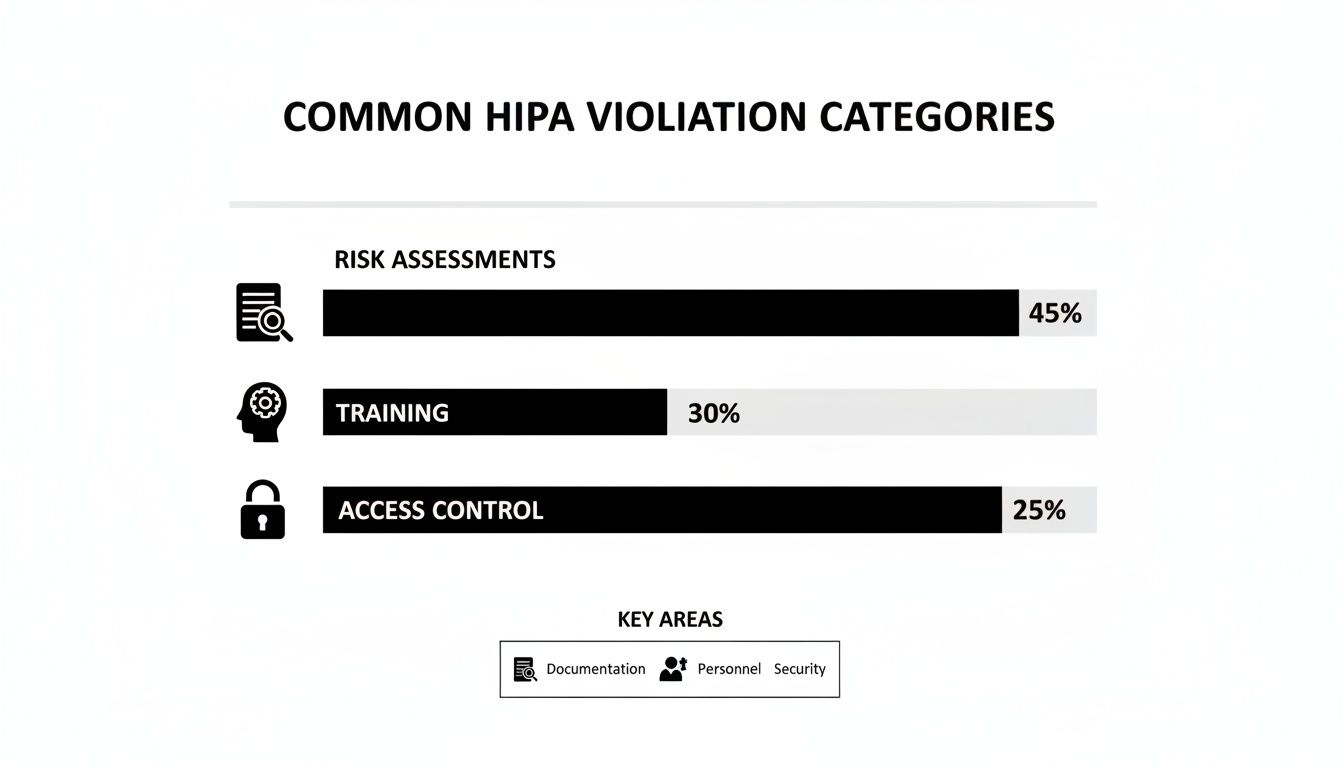
As the data shows, inadequate risk assessments are the single most common point of failure. This drives home the importance of having a structured approach to scoring and prioritization.
This need for actionable frameworks is nothing new. The HHS's own Security Risk Assessment (SRA) Tool, first launched in 2010, has seen multiple updates and over 500,000 downloads by 2025. It walks organizations through identifying vulnerabilities across 156 key areas, all centered on the confidentiality, integrity, and availability of PHI. You can learn more about how the official HHS tool has been updated over the years.
This methodical process of scoring and prioritizing is the bridge between finding problems and actually fixing them. It ensures your remediation efforts are targeted, effective, and defensible.
Creating Your Documented Remediation Plan
A risk assessment that just sits on a shelf is useless. Its value comes from the action it drives. Once you've identified threats, scored your risks, and prioritized what to tackle first, the most critical step is creating a documented remediation plan—often called a Corrective Action Plan. This is where you turn analysis into concrete, trackable tasks that improve your security.
This isn't about creating another document to file away; it's about building a living roadmap for your security efforts. For every high and critical-level risk you found, your plan must spell out the exact steps you'll take to fix it. This documented commitment is precisely what auditors look for as proof that you're serious about protecting ePHI.

From Findings to Actionable Tasks
Each task in your remediation plan must be crystal clear. Vague goals like "improve email security" won't cut it. You have to get specific and assign clear accountability for every item.
Our HIPAA risk assessment template includes a section designed for exactly this. For each high-priority risk, document these key details:
- Specific Remediation Task: Define the exact action. Instead of "enhance access controls," be precise: "Implement and enforce multi-factor authentication (MFA) for all Microsoft 365 accounts."
- Assigned Owner: Name the specific person or role responsible. This is non-negotiable; it eliminates confusion and creates direct accountability.
- Realistic Due Date: Set an achievable deadline. This creates urgency and provides a clear timeline for tracking progress.
- Required Resources: Note what you'll need to get it done. This could be a budget for new software, vendor support, or simply staff time.
This structured approach transforms a finding into a manageable project. Everyone knows what needs to happen, who’s responsible, and when it's due.
A well-documented remediation plan is your best defense in an audit. It demonstrates that you not only identified your risks but also established a formal, methodical process to address them. This proactive stance is a hallmark of a mature compliance program.
Concrete Examples of Remediation Tasks
Let's see how this plays out. Imagine your assessment uncovered two critical risks: a high likelihood of a successful phishing attack due to poor staff training, and the potential for a ransomware attack through an unpatched server.
Your remediation plan might include entries like this:
- Task: Conduct mandatory, interactive phishing simulation and training for all staff members who handle ePHI.
- Owner: Jane Doe, Compliance Officer
- Due Date: End of Q3
- Resources: Subscription to a security awareness training platform.
- Task: Deploy the latest security patches to all Windows Servers, starting with the server hosting the primary EHR database.
- Owner: John Smith, IT Manager
- Due Date: Within 7 business days
- Resources: After-hours maintenance window and IT staff time.
This level of detail makes the plan immediately actionable and creates a clean audit trail. The need for such detailed plans is only getting more urgent. Enforcement is ramping up, and the upcoming 2026 HIPAA changes are expected to mandate specific technical safeguards for all organizations, removing the old leniency for smaller providers. In fact, HHS data shows that from 2018 to 2025, OCR audits shot up by 300%, resulting in $134 million in fines for organizations with undocumented or generic assessments that failed to address their real operational risks. You can get more insights on the upcoming HIPAA changes on hipaavault.com.
By systematically turning your findings into a documented, actionable plan, you're closing the loop on the risk management process. This not only strengthens your defenses against real-world threats but also builds a resilient, audit-ready compliance program that fosters continuous improvement.
Maintaining Compliance as an Ongoing Process
Completing your risk assessment and building a remediation plan feels like crossing the finish line, but it’s just the starting block. HIPAA compliance isn't a one-time project; it’s a continuous process.
Technology changes, new threats emerge, and your organization evolves. A risk assessment that is even six months old can become irrelevant, leaving you with a false sense of security and serious compliance gaps. Your completed HIPAA risk assessment template must be a living document, not a static file that collects dust.
Triggers for an Immediate Review
Certain events are significant enough to demand an immediate review of your risk assessment, even if you just finished your annual review. These moments introduce new variables and potential vulnerabilities your last analysis couldn't have predicted.
You need to act right away when you:
- Implement new technology: Rolling out a new cloud-based EHR, a telehealth platform, or even a simple patient messaging app changes your risk profile instantly.
- Onboard a major vendor: Every new business associate with access to ePHI introduces their own set of risks that must be vetted and documented.
- Experience a security incident: Even a "minor" incident is a signal. It's an opportunity to determine if your controls failed or if a new threat vector has emerged that you need to address.
- Undergo significant operational changes: Events like opening a new clinic, merging with another practice, or shifting a large part of your workforce to remote work all create new risks.
Establishing an Annual Review Cycle
In addition to event-driven reviews, it is a best practice to conduct a full, top-to-bottom review of your risk assessment at least once per year.
Scheduling this annually makes it a predictable part of your operational rhythm. It stops being a dreaded, one-off task and becomes integrated into how you run your organization.
This ongoing cycle of monitoring, reviewing, and updating isn’t just a good idea—it’s a core requirement of the HIPAA Security Rule. Auditors don't just look for proof you did an assessment once. They want to see evidence of a living, breathing risk management program.
This discipline ensures your security posture keeps pace with the real world. By keeping your assessment current, you stay ready for audits and, more importantly, you build true resilience against actual threats. To learn more about maintaining this kind of constant watchfulness, check out our guide on how SOC monitoring can reduce cyber risk in real-time.
Your HIPAA Questions, Answered
Conducting a HIPAA risk assessment for the first time—or even the tenth—always brings up questions. Let's provide clear, actionable answers to some of the most common ones we hear.
How Often Do I Really Need to Do a HIPAA Risk Assessment?
The short answer is at least once a year. That's the baseline.
However, the HIPAA Security Rule requires more. You must conduct a new assessment anytime you make a significant change to your technology or operations. This includes launching a new EHR system, moving data to a new cloud provider, or recovering from a security incident. Treat it as a living process, not a one-and-done task.
Is a Free HIPAA Risk Assessment Template Good Enough?
A free template is an excellent starting point—it provides a solid framework so you aren't starting from scratch. But its real value depends on how you use it. You must customize it to fit your specific systems, workflows, and unique environment.
Simply filling out a generic template is one of the fastest ways to fail an audit. Why? Because it doesn't reflect your organization's specific risks.
A template gives you the structure, but your detailed, organization-specific analysis is what makes it a compliant and effective tool.
What’s the Difference Between a Risk Assessment and a Gap Analysis?
This is a great question, as the two are often confused.
A gap analysis is simpler. It's a direct comparison of your current practices against the specific HIPAA rules to find where you fall short. It’s an essential first step that answers the question, "Where are we non-compliant?"
A risk assessment goes much deeper. It takes those gaps (vulnerabilities), considers the real-world threats that could exploit them, and then calculates the likelihood and potential impact. The result isn't just a list of problems; it’s a prioritized roadmap of what to fix first, making it a far more strategic and actionable process.
At CitySource Solutions, we help healthcare organizations across the New York area transform compliance from a burden into a strategic advantage. Our security-first managed IT services are designed to protect your ePHI and ensure you're always audit-ready. Learn more at https://citysourcesolutions.com.